
The world of streaming is always evolving, and new apps bring promises of combining features in one place. One term people increasingly search is “Sky Glass IPTV APK.” What does it mean? Is there a legitimate version? How does it compare to traditional IPTV services? In this article, we’ll break down everything about Sky Glass IPTV APK, how it works, where to find and install it, device compatibility, risks, and why British IPTV 4K remains your safer and smarter option.
What Is Sky Glass & What Does It Offer?
Sky Glass as a Streaming Platform
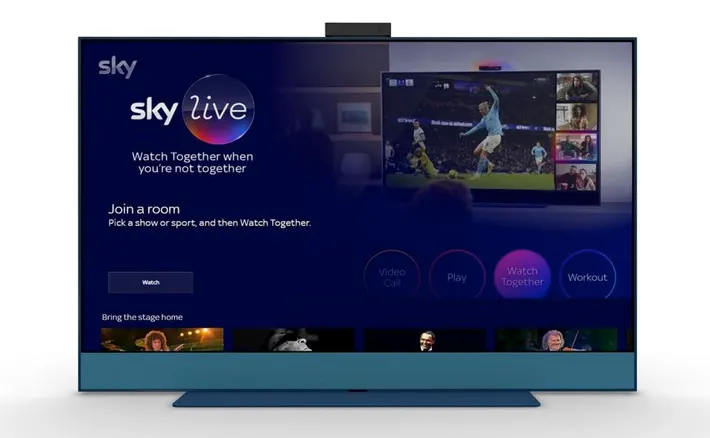
Sky Glass is a smart TV platform created by Sky. It integrates streaming, live channels, and on-demand content into one interface, eliminating the need for a satellite dish. Users get access to Sky’s subscription packages, including movies, series, sports, and Sky’s own “tiles” that combine live and streaming.
Because of that built-in integration, many users assume there is a “Sky Glass IPTV APK” that lets them load external IPTV sources (M3U, Xtream codes, etc.).
What “Sky Glass IPTV APK” Really Refers To
When people say Sky Glass IPTV APK, they often mean a modded app version or custom client that mimics the Sky Glass interface but allows adding external IPTV sources. In many cases, these are repackaged IPTV apps (like Smarters, IBO, XCIPTV) with a “Skin” resembling Sky Glass. However, such APKs are typically provider-locked or tied to a specific IPTV service. Forum users note:
“You will never get this apk without a provider… custom apps will be provider locked.” Techkings
So the “Sky Glass IPTV APK” is more of a branded UI overlay than an independent, universal client.
How Does Sky Glass IPTV APK Work?
Loading IPTV Sources
A typical Sky Glass IPTV APK will prompt you for:
- Server URL / API / Xtream codes
- Username / Password
- M3U playlist
Once entered, the app loads channels and VOD from that IPTV provider. The Sky Glass UI is just a front end.
Channel Aggregation & EPG
Many of these APKs also support EPG (Electronic Program Guide), category sorting, favorites, and search. But issues arise when the EPG data refreshes daily, causing blank guides — a common complaint:
“It does a fresh EPG import and scan for channels each day … annoying.” Techkings
Restrictions & Locks
Because many “Sky Glass IPTV APK” apps are created by individual IPTV providers, they lock them to their own servers. You often cannot switch provider or use your own credentials. As forums note:
“You can’t get this apk without a provider; they will be provider locked.” Techkings
Device Compatibility & Installation
Android Devices & Boxes
On Android smartphones, tablets, or TV boxes, you can usually sideload the Sky Glass IPTV APK via a browser or a tool like Downloader. The APK 1.6.4 version (≈46.9 MB) is one commonly cited mod. Apkrabi.com
Firestick / Amazon Devices
To install a Sky Glass IPTV APK on Firestick:
- Enable “Apps from Unknown Sources” in Settings → My Fire TV → Developer Options
- Install Downloader app
- Enter the URL for the APK (many mod sites host “sky-glass-iptv.apk”)
- Download and install, then enter your IPTV login credentials
There is a video guide showing how to install Sky Glass on Firestick: YouTube+1
Smart TVs, iOS, and Others
Smart TVs with Android OS may support sideloading, but many Sky Glass IPTV APKs don’t work on iOS/Apple devices. Instead, users use IPTV player apps (Smarters, GSE, XCIPTV) for iOS.
Where to Find the APK
You can find modded versions through sites like sky-glass-iptv.apkrabi.com (version 1.6.4) which host APKs for download. Apkrabi.com
Be cautious—many APKs are unverified, may contain malware, or may not work safely or reliably.
Comparing Sky Glass IPTV APK vs Standard IPTV Services
| Feature | Sky Glass IPTV APK | Standard IPTV (e.g. British IPTV 4K) |
|---|---|---|
| Provider Lock | Usually locked | You can use multiple apps and providers |
| Stability | Varies | Stable, high uptime |
| Support | Minimal or provider-only | Full 24/7 support |
| Legal Risk | Risky if using unlicensed streams | Safer if provider ensures licensing |
| Flexibility | Limited | High (use Smarters, IBO, VLC, etc.) |
While a Sky Glass IPTV APK might seem convenient as a one-app solution, it compromises flexibility, compatibility, and often legality. In contrast, British IPTV 4K gives you freedom of app choice, reliable servers, and full support.
Risks & Legal Considerations
Copyright & Licensing
Many Sky Glass IPTV APKs offer channels without proper licensing—this is illegal in many jurisdictions. Using them may expose you or the provider to legal risk.
Malware & Security
Downloaded APKs from unverified sources may include malware, spyware, or malicious code. Always verify sources.
Provider Lock-in
Because many of these APKs are locked, you cannot use them with other IPTV providers. You’re tied to one service, for better or worse.
Why British IPTV 4K Is a Better Choice
- Reliability: We use premium servers with anti-freeze technology so your streams stay stable.
- App Flexibility: We support multiple IPTV player apps — no skin locking or forced overlays.
- Wide Channel Library: Includes Spanish, UK, global, sports, movies, and more.
- Support & Safety: We ensure safe, licensed streams and provide 24/7 assistance.
- Free Trial: Try it for 24 hours and test performance yourself before paying.
Final Thoughts
The phrase “Sky Glass IPTV APK” refers broadly to modded versions of IPTV clients dressed in the Sky Glass UI. While it may seem like a slick way to combine features, the reality is that many versions are provider-locked, unstable, or legally risky.
If you want real freedom, reliability, and security in IPTV, go with British IPTV 4K. Our service offers the content you want, flexibility you need, and peace of mind you deserve. Try it free — no locks, no hidden restrictions.







