
When it comes to streaming live TV, movies, and on-demand shows, one app dominates the IPTV world — IPTV Smarters Premium. It’s fast, sleek, and full of features that make watching IPTV smoother than ever before. But what exactly is it, and why is it so popular among IPTV users worldwide?
In this complete guide, we’ll explain everything about iptv smarters premium, how it works, how to use it on different devices, and why pairing it with British IPTV 4K gives you the ultimate viewing experience.
What is IPTV Smarters Premium?
A Complete IPTV Player for All Devices
IPTV Smarters Premium is a professional IPTV player developed by WHMCS Smarters that allows users to watch live TV, movies, series, and catch-up content from any IPTV subscription that uses Xtream Codes API or M3U URL.
It doesn’t provide content by itself — instead, it serves as a gateway between your IPTV provider (like British IPTV 4K) and your device.
You simply enter your IPTV login details into the app, and it unlocks a full entertainment dashboard filled with live channels, EPG (Electronic Program Guide), and VOD libraries.
Why IPTV Smarters Premium Became So Popular
User-Friendly Interface
Unlike older IPTV apps that looked complicated and outdated, IPTV Smarters Premium offers a modern, clean design that’s easy for anyone to use. Everything from switching channels to browsing VODs feels intuitive.
High Compatibility
It supports Android, iOS, Windows, macOS, Firestick, Smart TVs (Samsung, LG), and even MAG boxes. You can literally use it anywhere.
Advanced Player Options
It integrates with external players like VLC and MX Player, allowing users to choose their preferred playback engine for the best performance.
Built-in EPG and Catch-Up
With the EPG guide, you can check what’s currently airing and what’s coming up next. The catch-up feature lets you replay content you missed — a lifesaver for sports fans and binge-watchers.
Multi-Screen & Multi-User Support
The premium version even allows watching multiple channels simultaneously or adding more than one account — great for families or users with different devices.
IPTV Smarters Premium vs Free Version
To understand why many users upgrade, let’s compare the premium and free versions of IPTV Smarters:
| Feature | IPTV Smarters (Free) | IPTV Smarters Premium |
|---|---|---|
| Live TV, Movies, Series | ✅ Yes | ✅ Yes |
| EPG (TV Guide) | ✅ Basic | ✅ Advanced |
| Multi-Screen Support | ❌ No | ✅ Yes |
| External Player Integration | ⚠️ Limited | ✅ Full |
| Parental Control | ❌ No | ✅ Yes |
| VPN Integration | ❌ No | ✅ Yes |
| Custom Branding | ❌ No | ✅ Yes |
| Device Compatibility | ⚠️ Basic | ✅ Full (Smart TVs, PC, iOS, Android) |
| Price | Free | One-time small fee |
As shown above, iptv smarters premium offers a much richer and more flexible experience, especially if you use IPTV daily.
When paired with a stable service like British IPTV 4K, the premium version truly shines — smoother streaming, better playback, and advanced settings to personalize your experience.
How IPTV Smarters Premium Works
Connecting Your IPTV Account
The app connects to your IPTV service through Xtream Codes API or M3U playlist. Once you input your credentials (provided by your IPTV provider), it automatically loads all available channels, movies, and series into an organized layout.
Here’s what you typically need from your provider:
- Xtream Codes login (username, password, and server URL)
- OR M3U playlist link
Once entered, the app verifies and syncs your account, giving you instant access to thousands of channels and on-demand titles.
How to Install and Set Up IPTV Smarters Premium
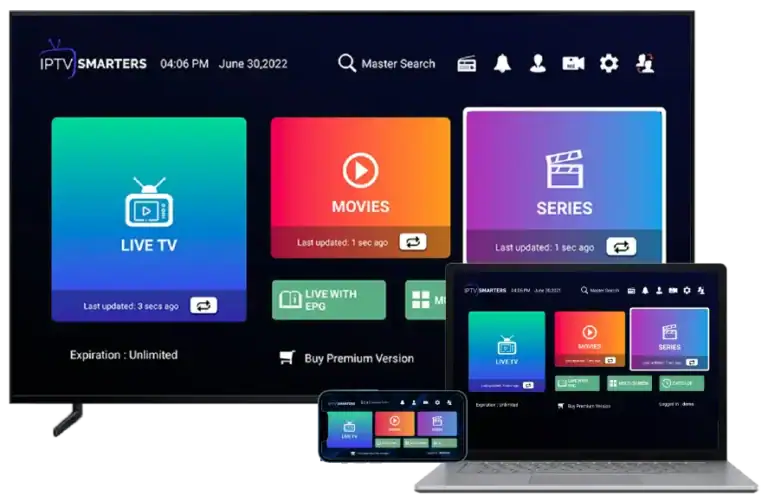
Setting up iptv smarters premium is easy, no matter what device you’re using. Let’s go through each step-by-step.
1. IPTV Smarters Premium on Android (Phone or TV Box)
Step 1: Open Google Play Store and search for IPTV Smarters Pro (Premium).
Step 2: Install the app and open it.
Step 3: Choose “Login with Xtream Codes API” or “Load Your Playlist or File URL”.
Step 4: Enter your credentials (from British IPTV 4K).
Step 5: Click “Add User” — your dashboard will appear instantly with Live TV, Movies, and Series sections.
💡 Tip: Enable “Hardware Decoder” under Settings for smoother 4K playback.
2. IPTV Smarters Premium on Firestick
Step 1: On your Firestick home screen, go to Settings > My Fire TV > Developer Options and enable “Apps from Unknown Sources.”
Step 2: Download the Downloader app from the Amazon Store.
Step 3: Open Downloader and type the IPTV Smarters Premium APK link (you can get it from the official Smarters site).
Step 4: Install the APK and launch it.
Step 5: Login using your Xtream Codes from British IPTV 4K.
You’re now ready to enjoy IPTV on your TV — simple, stable, and high-quality.
3. IPTV Smarters Premium on Smart TV (LG or Samsung)
Step 1: Go to the LG Content Store or Samsung App Store.
Step 2: Search for “IPTV Smarters.”
Step 3: Install the app (Premium version may require activation via website).
Step 4: Open it and enter your IPTV login details.
If you face any activation issues, you can upload your playlist via the official Smarters portal using your TV’s MAC address.
4. IPTV Smarters Premium on iPhone/iPad
Step 1: Open the App Store and search for Smarters Player Lite.
Step 2: The Premium upgrade can be purchased inside the app.
Step 3: Login using your Xtream Codes API details.
Step 4: Enjoy smooth playback and a premium UI optimized for iOS.
5. IPTV Smarters Premium on PC or Mac
Step 1: Download the Windows or macOS version from the official Smarters website.
Step 2: Install and launch the app.
Step 3: Login using your IPTV credentials.
Step 4: Navigate through Live TV, Movies, Series, and EPG from one clean dashboard.
Optimizing IPTV Smarters Premium for Best Results
To get the best out of iptv smarters premium, here are some professional tips:
Use a Reliable IPTV Provider
The app itself doesn’t control quality — your IPTV provider does. Choose a provider like British IPTV 4K that ensures high-speed, anti-freeze streaming and 99.9% uptime.
Enable Hardware Decoding
Go to Settings > Player Settings > Decoder and switch to “Hardware Decoder.”
This reduces lag and improves 4K playback performance.
Keep Your App Updated
Regular updates fix bugs and add new features like EPG improvements and subtitle synchronization.
Use a VPN (Optional)
If your ISP throttles IPTV traffic, a VPN can help maintain stable speeds and privacy
Why Pair IPTV Smarters Premium with British IPTV 4K
When you combine iptv smarters premium with British IPTV 4K, you unlock the perfect combo of software and service:
| Feature | IPTV Smarters Premium | British IPTV 4K |
|---|---|---|
| Interface | ✅ Clean, intuitive | ✅ Works seamlessly |
| Stability | ✅ Depends on provider | ✅ Anti-freeze technology |
| Channel Quality | ⚠️ Variable | ✅ 4K UHD ready |
| Support | ✅ Software only | ✅ 24/7 human support |
Together, they deliver unmatched streaming — whether for sports, news, or movies — with zero frustration.
FAQs About IPTV Smarters Premium
1. Is IPTV Smarters Premium free?
No. The app offers a free version, but iptv smarters premium unlocks more features like multi-screen, parental control, and external player options for a small one-time fee.
2. Does IPTV Smarters Premium provide channels?
No. It’s just a player — you need a valid IPTV subscription like British IPTV 4K to load channels and movies.
3. Can I use it on multiple devices?
Yes, the Premium version allows multi-device access with separate logins or one account depending on your IPTV plan.
4. Is it legal to use IPTV Smarters Premium?
Yes. The app itself is completely legal. What matters is the legality of the IPTV service you use it with. British IPTV 4K complies with fair use and legal streaming standards.
5. Why does my IPTV Smarters Premium buffer?
Buffering usually happens due to poor internet connection, ISP throttling, or unstable servers. British IPTV 4K uses anti-freeze servers to minimize this issue.
Conclusion: The Future of IPTV is Premium
In the evolving world of online entertainment, iptv smarters premium stands out as a powerful, flexible, and user-friendly app that transforms how we stream. Whether you’re using a Smart TV, Firestick, or smartphone, it delivers an elegant interface and flawless playback.
Paired with British IPTV 4K, you get everything — crystal-clear 4K quality, global access, and full reliability.
If you haven’t tried it yet, start with a 24-hour free trial and see why thousands are switching to the British IPTV 4K experience today.







