
What Is IPTV Smarters Firestick?
The term “IPTV Smarters Firestick” refers to using the popular IPTV Smarters app on Amazon’s Fire TV Stick — one of the most convenient ways to stream live TV, movies, and series through IPTV services. IPTV Smarters isn’t a provider itself but rather an IPTV player — an interface that connects to your IPTV subscription through login credentials or Xtream Codes.
Using IPTV Smarters on Firestick gives you a complete entertainment setup that’s both flexible and powerful. Whether you’re watching in 4K, streaming live sports, or catching up on movies, this combination is one of the most popular solutions among IPTV users today.
Why IPTV Smarters Firestick Is So Popular
Easy Setup and Use
The IPTV Smarters Firestick combo stands out for its simplicity. You don’t need a complicated installation or technical knowledge. The app can be downloaded directly using the Downloader app, and once you enter your IPTV credentials, you’re ready to stream.
Multi-Device Support
You can use the same IPTV Smarters account on several devices — Firestick, Android TV, iOS, and even Windows or macOS computers. This flexibility is one of the main reasons users prefer it.
Great for IPTV 4K Streams
With the right IPTV provider (such as British IPTV 4K), IPTV Smarters can deliver stunning visuals and smooth playback — even for ultra-high-definition channels.
Preparing Your Firestick for IPTV Smarters
Before installing IPTV Smarters, your Firestick needs to allow installations from unknown sources. This is completely safe when you download trusted IPTV apps.
Step 1: Enable Developer Options
- On your Firestick remote, go to Settings → My Fire TV → Developer Options.
- Turn on Apps from Unknown Sources.
This step allows the Downloader app to install IPTV Smarters safely.
Step 2: Install the Downloader App
- Go to the Amazon App Store on your Firestick.
- Search for Downloader and click Download.
- Once installed, open Downloader — this is how you’ll install IPTV Smarters.
Installing IPTV Smarters Firestick (Step-by-Step)
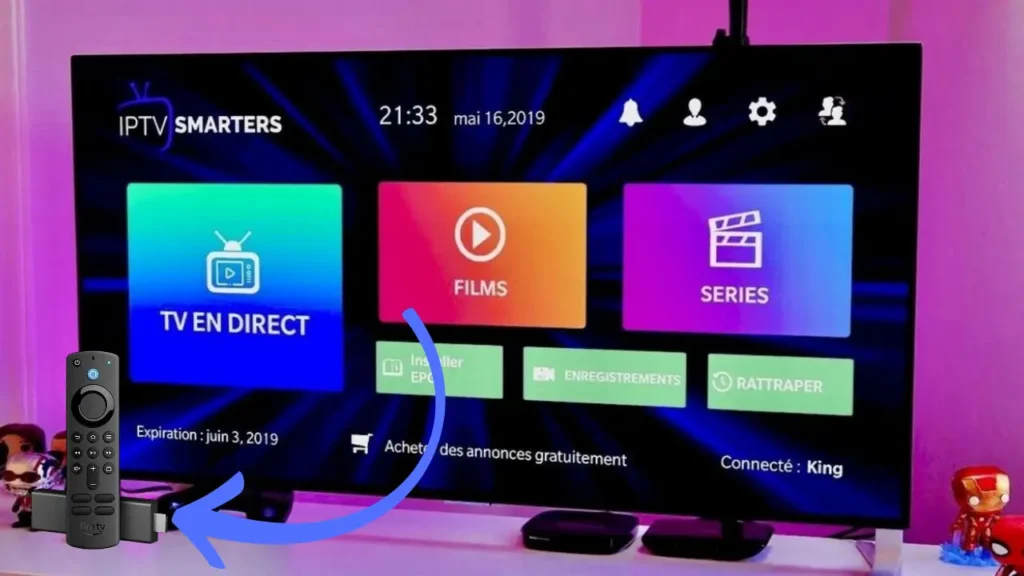
Step 1: Download IPTV Smarters
- Open Downloader.
- In the URL field, type the official IPTV Smarters download link (for example:
https://www.iptvsmarters.com/smarters.apk). - Press Go.
- The APK file will download automatically.
Step 2: Install the App
- Once the download is complete, select Install.
- After installation, click Open to launch the IPTV Smarters app.
Step 3: Log In Using Your IPTV Credentials
When you open IPTV Smarters, you’ll see multiple login options:
- Load Your Playlist or File/URL
- Login with Xtream Codes API
- Load Data from Device
For Firestick users, the Xtream Codes API method is the most convenient and stable.
Understanding Xtream Codes Login
Xtream Codes are a set of unique details your IPTV provider gives you to connect your app to their servers. Typically, these include:
- Username
- Password
- Server URL (or portal URL)
With a reliable provider like British IPTV 4K, you receive all these credentials instantly after purchasing your subscription. Just enter them into the IPTV Smarters login form — and within seconds, your channels, movies, and series will start loading.
How to Use IPTV Smarters Firestick After Installation
Once logged in, you’ll see a clean, user-friendly interface. Here’s how to get the best out of it:
Navigate Through the Dashboard
The app divides content into categories like Live TV, Movies, and Series, making it simple for anyone — even non-tech-savvy users — to use.
Add Favorite Channels
You can mark channels as favorites for faster access later, which is ideal if you watch the same sports or news channels daily.
Catch-Up and EPG Features
If your provider supports it, you’ll also get Catch-Up TV and a built-in EPG (Electronic Program Guide) — features that make IPTV Smarters Firestick feel just like a traditional cable service but with far more flexibility.
Troubleshooting IPTV Smarters Firestick
Even though IPTV Smarters is one of the most stable IPTV apps available, sometimes users encounter small issues. Here’s how to handle them:
Buffering or Lag
Usually, this isn’t caused by the app but by the IPTV provider or your internet speed. Ensure your connection is at least 25 Mbps for 4K streaming.
Login Errors
If you see login errors, double-check your Xtream Codes details. A single space or letter mistake can block access.
App Not Opening
If the IPTV Smarters Firestick app crashes or fails to open, try clearing its cache from Firestick settings, or reinstall it via Downloader.
Why Choose British IPTV 4K for IPTV Smarters
Not all IPTV services are equal. Many providers suffer from unreliable servers, channel drops, or low-quality streams. That’s why it’s important to pair your IPTV Smarters Firestick with a trusted IPTV provider.
British IPTV 4K offers:
- High-speed servers with 99.9% uptime
- Backup servers in case of outages
- Full 4K and HD support
- Friendly customer service available 24/7
British IPTV 4K even provides Xtream Codes access and M3U playlists, ensuring compatibility with IPTV Smarters and other IPTV players. So, whether you’re watching live football, premium movies, or TV shows, your experience remains smooth and reliable.
IPTV Smarters Firestick Review
Pros
- Very user-friendly interface
- Works perfectly on Firestick
- Supports multiple IPTV accounts
- Easy login via Xtream Codes
Cons
- Requires manual updates occasionally
- No direct content (depends on provider)
Overall, IPTV Smarters Firestick remains one of the best IPTV players in 2025 — especially when used with a strong provider like British IPTV 4K.
Final Thoughts: The Perfect Pairing for Streaming Freedom
The combination of IPTV Smarters Firestick gives users one of the most convenient, affordable, and flexible ways to stream live TV and movies in 2025. With just a few simple steps, you can turn your Firestick into a full-featured smart entertainment hub.
However, the quality of your viewing experience depends entirely on your IPTV provider. That’s why choosing a reliable service like British IPTV 4K ensures smooth performance, 4K clarity, and continuous uptime — even during peak hours.
So if you’re setting up IPTV Smarters Firestick, make sure to pair it with a provider that values your satisfaction — because great streaming deserves great support.







