
Introduction — what this guide covers
If you’ve been around IPTV for any length of time you’ve probably heard the phrase “iptv downloader codes.” Those short numeric codes let you install apps quickly on Fire TV, Android sticks, MAG boxes, and other devices using downloader tools — no searching, no messy links, just paste a code and the app starts downloading.
This article explains what iptv downloader codes are, how they’re commonly used, gives a cleaned & organised list of the IPTV downloader codes you gave me, compares categories, and — importantly — walks you through a step-by-step method to create your own IPTV downloader codes for an APK you legally own. I’ll also cover best practices and show why using a trusted IPTV provider like British IPTV 4K removes a lot of the risks around unknown apps and broken codes.
Throughout the piece I’ll keep a practical tone and make sure everything is usable inside WordPress Gutenberg: headings, tables, FAQs, and a helpful step-by-step build.
What are IPTV downloader codes and how do they work?
Short answer
IPTV downloader codes are short numeric tokens (or “active codes”) that downloader apps map to a hosted APK (or URL). When you enter the code in the downloader app (or enter a mapped URL), the app resolves the code to the real download link and installs the target APK automatically.
The usual workflow
- Seller or dev hosts the APK at a stable URL (cloud storage, CDN, your server).
- A “code” provider (or your own redirect script) maps a short code to that URL.
- The downloader app (on Firestick/Xiaomi/Android) queries the code mapping service, gets the full URL, and begins downloading the APK.
- User installs the APK and runs the app.
Advantages: fast installs, tidy UX for customers, fewer paste errors.
Risks: if the code points to an untrusted APK, you can get malware or a broken app — so code provenance matters.
Clean, organized list of IPTV downloader codes
Below I cleaned and grouped the codes you provided. I removed duplicates and placed each code under a category that makes it easy to locate the app you need.
IPTV player & media apps (codes)
| App / Purpose | IPTV Downloader Code |
|---|---|
| Duplex Play | 70554 |
| IPTV Smarters Pro | 78522 |
| SmartIPTV | 26604 |
| XCIPTV | 63207 |
| TiviMate | 72816 |
| Elk Player | 82854 |
| IBO Player | 71949 / 460383 / 325557 |
| Crystal (active) | 34195 |
| Crystal (user/pass) | 11945 |
| BayTV | 67301 |
| SetIPTV | 79205 |
| NetTV Stalker | 50345 |
| NetTV | 390953 |
| NeerTV | 64071 |
| SUPTV | 78892 |
| Rocksat | 834826 |
| DeniSat | 83034 |
| Dino XCIP v1 | 41626 |
| KING PRO XC V2 | 38478 |
| WesoPro | 21467 |
| Flix IPTV | 517161 |
| Room IPTV (various) | 857054 or 195028 or 498307 |
| Smart+ | 66219 |
| Flix IPTV | 517161 |
| IBO Player Pro | 538839 |
Sansat family (codes)
| App / Purpose | Downloader Code |
|---|---|
| Sansat Pro Smarters | 71003 |
| SansatBox | 24209 |
| SansatPhone | 25367 |
| Sansat IPTV | 61392 |
| Sansat 3.0 | 88197 |
| Sansat v6 | 30427 |
Utility / App store / media tools
| App / Purpose | Downloader Code |
|---|---|
| Aptoide (store) | 48157 |
| SmartTubeNext | 79040 |
| DLTA / DLTA4K | 33095 / 79928 |
| Fuego | 966183 |
| Tango Pro | 24102 |
| Strong 4K | 750436 |
| Magnum OTT code | 23437 |
ENIGMA & STB / MAG related codes
| Item | Code |
|---|---|
| ENIGMA Xtream | 210134 |
| ENIGMA V5 | 346720 |
| ENIGMA V6 | 748340 |
| ENIGMA IPTV Intro | 251355 |
| ENIGMA IPTV Pro | 304952 |
| ENIGMA VIP | 775863 |
| Magnum active | 313756 |
| Magnum userpass | 102252 |
Mega / other multi-system codes
| Item | Code |
|---|---|
| Mega OTT user/pass | 92848 |
| Mega XC | 22896 |
| Mega+ OTT | 64173 |
DNS / device-level helper
- DNS for Smart TV (Samsung / LG / Windows): 93.115.22.122
How to use these codes safely (best practices)
1 — Verify the source
Only use codes you received from a trusted seller or your own infrastructure. If a code was posted in a random Telegram group, treat it as risky.
2 — Use official downloader apps
Use trusted downloader apps that have a good reputation (e.g., the widely used downloader apps on Fire TV). Always use the official app store when possible.
3 — Check APK provenance
If you’re installing an APK via a code, verify the APK checksum (SHA256) is what the provider claims. That ensures the file was not tampered with.
4 — Use sandboxed devices for testing
Install new APKs on a secondary device first, not on your main TV or sensitive accounts.
5 — Keep backups and rollback options
If you manage a group of devices, keep backups of known-good firmware/apps and the mapping of codes to URLs.
Step-by-step: How to create your own downloader code for an APK you own
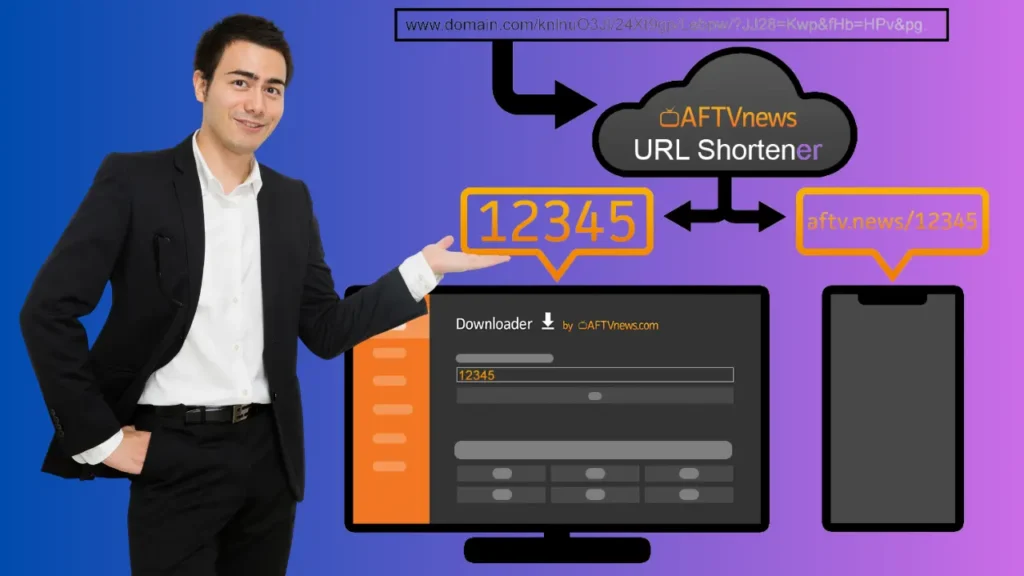
Below is a practical, legal, and secure method to create your own code mapping so you can distribute an APK to your customers without revealing raw URLs. This assumes you own the APK or have permission to distribute it.
Overview
We’ll walk through a simple workflow:
- Host the APK in a stable place (S3, Cloud Storage, or Google Drive with a direct link).
- Create a short mapping (code → URL) using either a third-party shortener or your own microservice.
- Configure your downloader app to use that mapping (or instruct users how to enter the code into the downloader).
Method A — Quick & easy (Google Drive + URL shortener approach)
This method is fast and requires no server.
- Upload the APK to a cloud host you control (Google Drive, Dropbox, or S3 are common).
- If using Google Drive, set the file’s share setting to “Anyone with link — Viewer.”
- Note: public links can be revoked anytime — consider S3 for production.
- Obtain a direct download link
- For Drive you may need to convert a “drive.google.com/file/d/ID/view” to a direct download link (there are known patterns; be careful — Google can change behavior).
- Alternatively use S3 or another host that gives you a direct, long-lived URL.
- Shorten or map the link to a code
- Use a trusted URL shortener or a downloader mapping service (some downloader ecosystems accept custom short codes).
- Example: use a public shortener that supports vanity codes (or a service that generates numeric shortcodes).
- Optionally, create your own mapping page on your domain:
example.com/code/12345which redirects (302) to the long APK URL. This way the code is simply the last path segment (12345).
- Distribute the code to your users and instruct them to enter it in the downloader app. The downloader will query your short link or mapping endpoint and receive the APK URL.
Pros: fast, no server code if you use a shortener.
Cons: public shorteners can be rate-limited and are less controllable.
Method B — Robust (use your own tiny redirect service — recommended for businesses)
This gives you control, analytics, expiry, and security.
- Host the APK on a CDN or S3 bucket with limited-time signed URLs (for higher security).
- Create a simple mapping database (code → file URL, expiry timestamp). A simple table in MySQL or SQLite is enough.
- Write a small redirect API (PHP, Node, Python) that:
- Receives a code:
GET /d/70554 - Looks up the code in the DB
- If valid, returns a 302 redirect to the signed URL (or returns a small JSON payload with the direct URL for downloaders that expect JSON).
- Optionally log IP, user-agent, and timestamp for auditing.
<?php // d.php?c=70554 $code = $_GET['c'] ?? ''; // lookup in database - example array for demo $map = [ '70554' => 'https://your-cdn.example.com/apks/duplex-play.apk' ]; if (isset($map[$code])) { header("Location: " . $map[$code], true, 302); exit; } else { header("HTTP/1.1 404 Not Found"); echo "Code invalid"; } ?> - Receives a code:
- Protect & automate:
- Generate signed URLs to expire after, say, 1 hour.
- Update the DB entry when you rotate the APK.
- Provide each customer with a unique code (or reuse codes for general access).
- Downloader app compatibility: Many downloader apps accept numeric code mapping if you point a downloader to your mapping endpoint or use a compatible shortener service.
Pros: full control, analytics, ability to invalidate, legal compliance.
Cons: needs a tiny server and some dev work.
Method C — Use an existing downloader code service
Some ecosystems (used by Firestick community) provide a code-generation service you can plug into. These are quick but less private; if you run a commercial operation, host your own mapping.
Example: Create a code and push it to customers (end-to-end)
- Build or obtain
myapp-v1.2.apk. - Upload to S3:
https://cdn.example.com/myapp-v1.2.apk(or a signed link). - Add mapping:
70554 -> https://cdn.example.com/myapp-v1.2.apk - Give customers code 70554 and instruct them to open their downloader and enter the code.
- When you release v1.3, update the mapping to the new APK: users who use the same code get the new APK automatically.
Table: Quick pros & cons of code methods
| Method | Effort | Control | Security | Best for |
|---|---|---|---|---|
| Drive + shortener | Low | Low | Low | Small deployments, tests |
| Redirect service (your server) | Medium | High | High | Commercial use, repeat customers |
| Third-party code provider | Low | Medium | Medium | Quick campaigns, non-critical apps |
Legal & safety notes (must-read)
- Only distribute APKs you own or have explicit permission to distribute.
- Do not use IPTV downloader codes to distribute copyrighted apps without licensing. That’s illegal and harmful.
- Always scan APK with antivirus / malware scanner before distribution.
- Prefer signed APKs and verify signatures on install where possible.
- Consider using code expiry and per-customer codes to limit abuse.
If you’re unsure about the license for a given APK — don’t distribute it.
How British IPTV 4K helps with downloader codes and safe installs
At British IPTV 4K we prefer to remove friction while protecting customers:
- We deliver secure, pretested app packages when needed.
- We provide one-click installers or safe mapping codes generated by our infrastructure (if a device needs a custom app) — but only for apps we manage or have licensed.
- Our support team walks customers through the downloader process step-by-step and verifies checksums.
- We never push unknown APKs from anonymous Telegram channels — everything we distribute is clean and tested.
That’s why many customers switch to British IPTV 4K: you get convenience (codes) and safety.
FAQ — downloader codes & APK creation
Q: What exactly is an “iptv downloader codes”?
A: A short token (numeric or alphanumeric) that your downloader app resolves into an APK URL. Entering the code starts the download.
Q: Are all IPTV downloader codes safe to use?
A: No. Only use codes from trusted sources or your own infrastructure. Public Telegram groups often carry malicious APKs.
Q: Can I make my own IPTV downloader codes without a server?
A: Yes — using cloud storage + a URL shortener or a third-party mapping service. For production you’ll want your own server.
Q: Can I revoke a code after issuing it?
A: Yes — if you control the mapping (use a DB or signed URLs), you can revoke codes instantly.
Q: What downloader apps work with codes?
A: Many Fire TV / Android downloader utilities support mapping codes or accept a short URL. Check the downloader documentation for the expected input format (numeric code vs vanity slug vs JSON endpoint).
Final checklist before you issue codes to customers
- Confirm you legally own/distribute the APK.
- Host the APK on a secure, fast host (S3, CDN, trusted cloud).
- Implement link protection (signed URLs) or expiry.
- Use a mapping service with logging & revoke capability.
- Provide customers with an installation guide and checksum.
- Monitor usage and rotate codes if abused.
Closing — use IPTV downloader codes the smart way
IPTV downloader codes are powerful — they make installs seamless for customers and reduce support friction. But with convenience comes responsibility: protect users, host APKs securely, and always follow licensing laws.
If you’d like, British IPTV 4K can generate safe IPTV downloader codes for your devices (for our officially distributed apps), provide checked APKs, and support customers step-by-step during install. That’s the secure, professional approach — quick like a code, safe like a pro.







