
What Is Snappier IPTV?
Snappier IPTV is a dedicated IPTV client application designed primarily for Apple devices — iPhone, iPad and Apple TV (especially Apple TV 4K). AppTail+3Apple+3snappieriptv.app+3
Unlike an IPTV service, it does not supply content or channels. Instead, it allows users who already have an IPTV subscription (for example from British IPTV 4K) to load their playlists or Xtream Codes credentials and stream content via a refined, feature-rich interface.
Since it supports M3U playlist URLs, Xtream Codes login, multi-playlist handling, catch-up, advanced features like multi-screen, HDR, and more, Snappier IPTV offers a premium experience for users who want control and flexibility. Apple+1
Why Use Snappier IPTV?
Compatibility & Access
Snappier IPTV supports both M3U URL playlists and Xtream Codes format (server login, username, password). Apple+1 This means you can use it with almost any modern IPTV subscription, including those from British IPTV 4K.
If you already have an IPTV service, by using Snappier IPTV you gain a high-end interface, smooth playback, and advanced features often missing in generic players.
Features & Performance
Listed features of Snappier IPTV include: snappieriptv.app+1
- Live TV, VOD (Movies & TV Series), Catch-Up support (depending on provider)
- 4K, HDR support (on compatible devices)
- Three built-in media players: KSPlayer, VLC and MPV
- Multi-playlist management and iCloud sync across devices
- Multi-screen viewing (1×1, 2×1, 2×2)
- EPG support, metadata editing, parental controls, search across channels/series/movies
- Custom categories, favorites, hide unwanted categories, auto-resume playback
This rich feature set makes Snappier IPTV a strong choice on Apple devices.
Designed for Apple Ecosystem
Because it is optimized for Apple devices (tvOS, iOS, iPadOS), the user experience tends to be cleaner. On Apple TV 4K it performs best, with full HDR and Apple remote support. Apple
For users invested in Apple hardware, this is a major advantage.
Snappier IPTV: Setup Walk-through
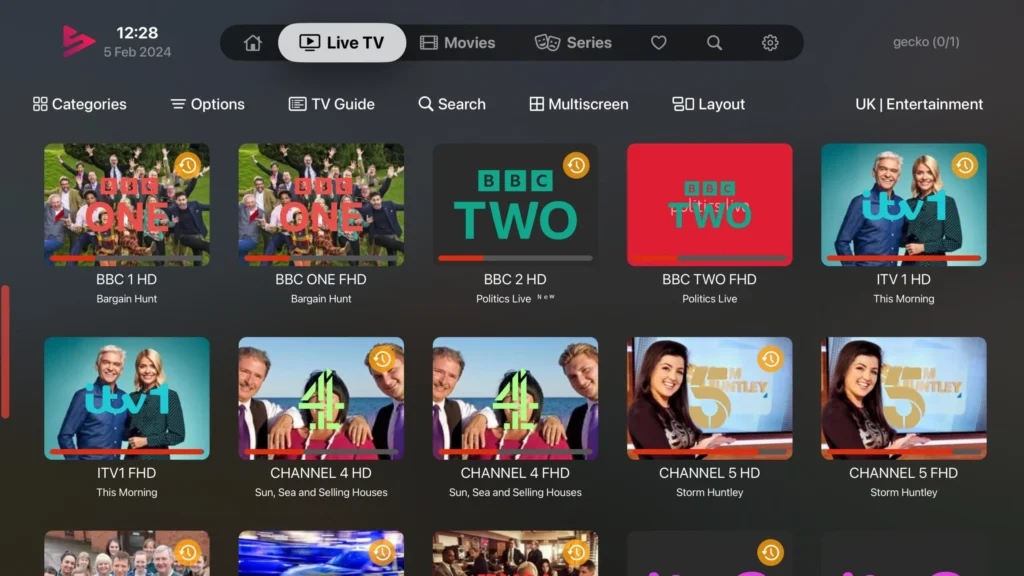
What You’ll Need
- A working IPTV subscription that supports M3U or Xtream Codes (for example through British IPTV 4K)
- An Apple device (iPhone, iPad or Apple TV)
- Snappier IPTV app installed from the App Store
- Your playlist URL or Xtream Codes login details from your IPTV provider
Step by Step Installation
Install App
Search “Snappier IPTV” in the App Store on your device and install it.
Add Your Subscription
Open the app → choose “Add Playlist” or “Xtream Codes Login” → enter your credentials or URL.
Configure Settings
Enable EPG (if your provider supports it), turn on HDR if available, set preferred player (KSPlayer, VLC, MPV) depending on device performance.
Explore & Enjoy
Browse live channels, browse VOD library, use favorites, multi-screen or catch-up features as supported by your IPTV plan.
Troubleshooting
If channels freeze or don’t load, check your provider’s server status (for example British IPTV 4K has backup servers), check your internet speed, or update playlist/EPG manually. Some Reddit users note minor bugs but rapid updates are available. appshunter.io+1
Comparing Snappier IPTV with Other Popular IPTV Apps
Here is a table comparing Snappier IPTV with other players, especially in the Apple device space:
| App | Platform | M3U/Xtream Support | 4K/HDR | Multi-Screen | Best For |
|---|---|---|---|---|---|
| Snappier IPTV | iOS / tvOS | ✔✔ | ✔ (Apple TV 4K) | ✔ (1×1,2×1,2×2) | Apple users |
| IPTV Smarters Pro | Android / iOS / Fire TV | ✔✔ | ✔ | ✔ (some) | Cross-platform general |
| Tivimate | Android / Fire TV | ✔✔ | ✔ | ✔ | Android/Firestick loyalty |
| UHF App | Apple TV | ✔✔ | ✔ | ✔ | Apple heavy users (per Reddit) Reddit+1 |
| Perfect Player | Android | ✔✔ | ✔ | ✖ | Budget Android users |
Highlights:
- If you have Apple devices exclusively, Snappier IPTV stands out for optimized performance.
- Android/Fire TV users may prefer apps like Tivimate or IPTV Smarters Pro.
- Snappier IPTV’s rate of updates and Apple-only focus give it a polish many others lack.
- Some users on Reddit still prefer UHF over Snappier for certain Apple features. Reddit
Advantages and Limitations of Snappier IPTV
Advantages
- Interface optimized for large screen Apple TV 4K and mobile iOS devices
- Advanced media player options (KSPlayer, VLC, MPV) for power users
- Multi-playlist capability lets you switch providers easily (for example if you use British IPTV 4K and another service)
- Feature rich: 4K/HDR, catch-up, EPG, favorites, custom categories
- Clean design, frequent updates
Limitations
- It’s limited to the Apple ecosystem — Android/Smart TV users will need alternate players
- The app requires an existing IPTV subscription (it doesn’t supply channels)
- Some functions depend on the provider’s playlist quality; if your IPTV provider has poor EPG or broken links, that will impact your experience
- Lifetime purchase or subscription means you are still dependent on provider for content
- Some users report bugs or lag after updates, though the developers respond quickly. AppTail
Why Use Snappier IPTV with British IPTV 4K
At British IPTV 4K, we focus on providing high-quality streaming services, optimized servers, 4K content, global coverage and top-tier support. When you pair that with the polished client experience of Snappier IPTV, you unlock:
- A premium setup for Apple device users
- Full access to 40,000+ live channels and VOD supported by British IPTV 4K
- 4K playback reliability and anti-freeze technology
- Simple playlist delivery and instant load in the Snappier IPTV app
- Support team ready to assist with setup on Apple TV, iPad, iPhone
If you’re using Apple hardware and want a refined experience, this combo is among the best in class.
Real-User Feedback & Community Insight
From Reddit and App Store reviews:
“On Apple TV there is only one respectable IPTV app: UHF.” Reddit
“Snappier is the best I have found, have a choice of players in it.” Reddit
“It’s a good app with a good UI but seems like every new update comes with new problems.” AppTail
Overall, user sentiment is positive for performance and features, but some caution about minor bugs and premium cost. The key: good IPTV provider (like British IPTV 4K), good playlist, and Snappier IPTV app results in a top-tier experience.
Frequently Asked Questions (FAQ)
What is the difference between Snappier IPTV and an IPTV service?
Snappier IPTV is a client app or player only. You still need an IPTV service (subscription) from a provider like British IPTV 4K that supplies the playlist or Xtream Codes login.
Does Snappier IPTV support 4K or HDR?
Yes — on compatible devices (Apple TV 4K, newer iPads) Snappier supports HDR, high bitrate streams and 4K playback — assuming your IPTV provider supplies 4K content. AppTail
Which devices can I use with Snappier IPTV?
Mainly iPhone, iPad and Apple TV (tvOS). On Apple TV 4K it is fully optimized. There is no strong version for Android or Smart TVs, so non-Apple users should consider alternative apps. Reddit
Can I use it with British IPTV 4K?
Absolutely. If you’re a subscriber of British IPTV 4K, simply load your playlist URL or Xtream Codes login into Snappier IPTV and you’ll be able to use the app’s features with our service.
How much does Snappier IPTV cost?
The app itself has a free version (limited playback) and in-app purchases/subscriptions for full functionality. Price varies by region. AppTail
Are there bug issues?
Some users report minor bugs or performance hiccups especially after updates. The developers are active and push updates frequently. Good practise: keep app updated and ensure your playlist is clean.
Final Thoughts
If you’re using Apple hardware and want a superior IPTV client, Snappier IPTV stands out thanks to its optimized performance, advanced features, and clean interface. When paired with a reliable provider like British IPTV 4K, you get a premium streaming experience: thousands of channels, robust VOD, 4K support, high stability and excellent device compatibility.
While it is a bit more Apple-centric than some competitors, for users in that ecosystem it’s one of the best choices available today. Whether you’re a casual viewer or a power user wanting customization, multi-playlist capability and high quality playback, this setup delivers.
Invest in a good provider, load it into Snappier IPTV on your Apple TV 4K, and you’ll be set for top-tier streaming.







